Three Claudes Walk Into a GitHub Repo
I set up an AI to manage other AIs that write code. Here's how to build your own Claude army.
The Problem
Too many project ideas, not enough time. I'm good at writing detailed requirements, but slow at implementation. The mental context-switching between "architect mode" and "implementation mode" kills momentum.
What if AI could do the boring parts while I focus on what matters — defining what to build and why?
The Solution: Claude Code GitHub Actions
Anthropic recently released Claude Code, a CLI tool that lets Claude write code in your repositories. Combined with GitHub Actions, you get something powerful: write an issue, get a pull request.
The workflow looks like this:
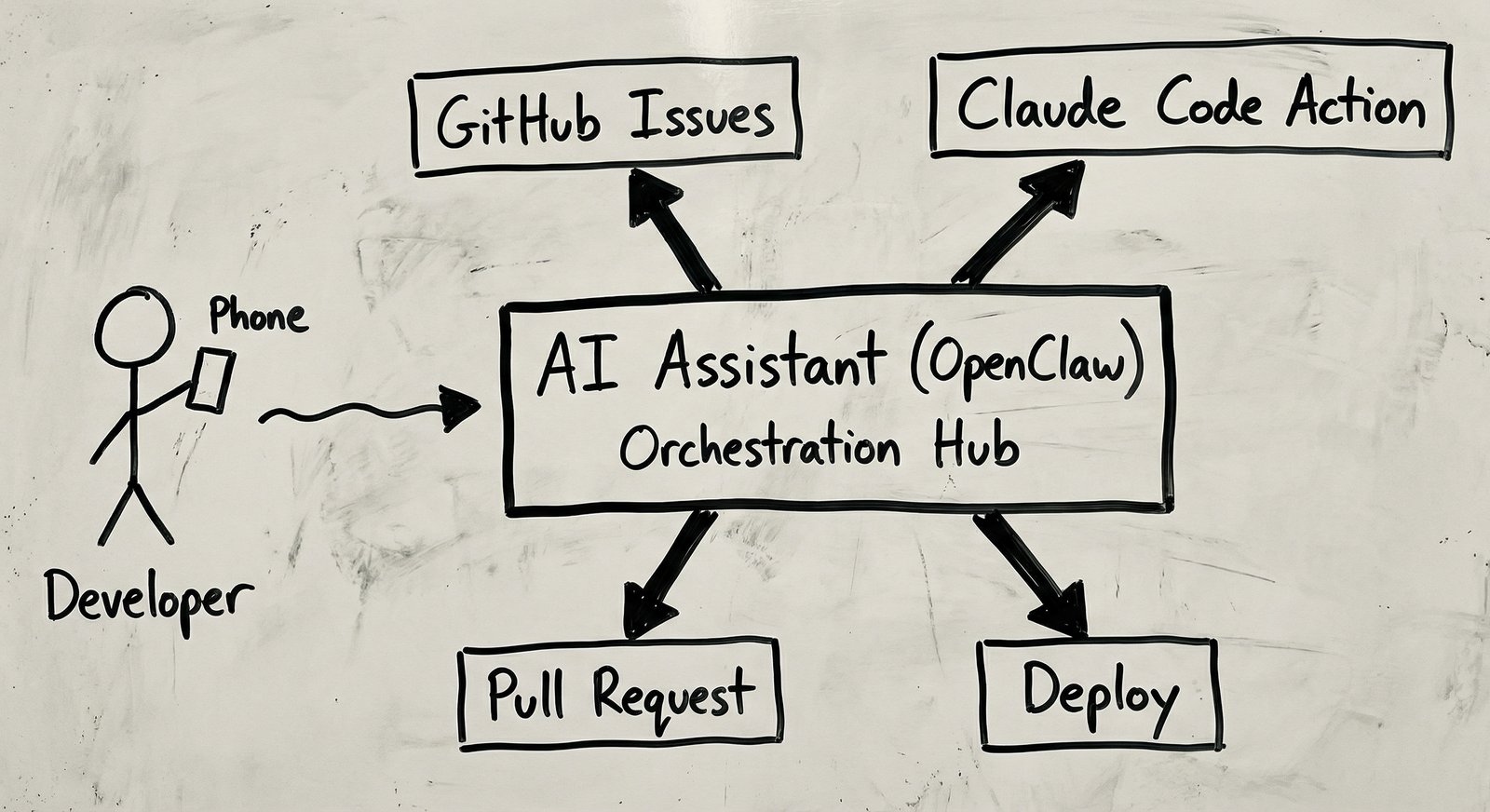
- You write a detailed issue (feature request, bug report, or PRD)
- GitHub Action triggers when you @mention Claude
- Claude Code reads the issue, writes the code, runs tests
- Pull Request is created automatically
- You (or another AI) review and merge
Setting It Up
Step 1: Install the GitHub App
Run this in your terminal:
claude /install-github-app
This opens a browser to authorize the Claude Code GitHub App. Select the repositories you want to enable.
Step 2: Add the Workflow File
Create .github/workflows/claude.yml:
name: Claude Code

on:
  issue_comment:
    types: [created]
  issues:
    types: [opened, edited]

jobs:
  claude:
    if: contains(github.event.comment.body, '@claude') || contains(github.event.issue.body, '@claude')
    runs-on: ubuntu-latest
    permissions:
      contents: write
      pull-requests: write
      issues: write
    steps:
      - uses: actions/checkout@v4
        with:
          fetch-depth: 1

      - name: Run Claude Code
        uses: anthropics/claude-code-action@beta
        with:
          github_token: ${{ secrets.GITHUB_TOKEN }}
          anthropic_api_key: ${{ secrets.ANTHROPIC_API_KEY }}
Step 3: Add Your API Key
Go to your repo's Settings → Secrets → Actions, and add:
ANTHROPIC_API_KEY: Your Claude API key from console.anthropic.com
Step 4: Write an Issue
Here's an example issue that works well:
## Feature: Add Dark Mode Toggle

### Context
Users have requested a dark mode option. The app currently only supports light mode.

### Requirements
- Add a toggle button in the header
- Persist preference in localStorage
- Use CSS custom properties for theme colors
- Default to system preference

### Technical Notes
- Use the existing Button component
- Theme colors should be defined in `src/styles/theme.css`

@claude please implement this feature
What I Learned
Be Specific in Your Issues
The quality of Claude's output directly correlates with the quality of your input. Vague issues get vague code. Detailed PRDs get production-ready implementations.
Include:
- Context: Why does this feature exist?
- Requirements: What specifically needs to happen?
- Technical notes: Any constraints or existing patterns to follow?
- Acceptance criteria: How do we know it's done?
The OAuth vs API Key Gotcha
I spent an hour debugging "unauthorized" errors before realizing the difference:
- GitHub App OAuth (via
/install-github-app): Lets Claude access your repos - Anthropic API Key (in secrets): Lets the Action call Claude's API
You need both. The error messages don't make this obvious.
Claude Reads Your Entire Repo
Before writing code, Claude analyzes your existing codebase. It picks up on:
- Coding style and conventions
- Existing patterns and abstractions
- Project structure
- Dependencies
This means the generated code usually matches your style. It's not just plopping in generic solutions.
Review Still Matters
Claude is good, not perfect. I've seen it:
- Miss edge cases the issue didn't mention
- Over-engineer simple features
- Use deprecated APIs (its training has a cutoff date)
Treat Claude's PRs like PRs from a junior developer who codes fast but needs review.
The Three Claudes Pattern
Here's where it gets interesting. I run three Claude instances:
- Claude Code Action: Writes code from issues
- Claude in my terminal: For local development and debugging
- Claude as an assistant: Reviews PRs, manages projects, monitors activity
They coordinate through GitHub. The assistant @mentions the Action, reviews its PRs, and handles the project management layer. It's Claudes all the way down.
Real Results
After setting this up across three of my repos, here's what happened in one night:
| Project | Feature | Time to PR | Lines of Code |
|---|---|---|---|
| Music app | Chord quiz game | 3m 46s | 733 |
| Utility app | PDF text extraction | 2m 57s | 432 |
| Side project | Backend API | 6m 22s | 1,159 |
That's 2,300+ lines of code from three detailed issues, ready for review in under 15 minutes of wall clock time.
Should You Do This?
Yes, if:
- You're good at writing requirements but context-switching to implementation is costly
- You have many small features/bugs that don't justify deep focus time
- You want to prototype ideas quickly before investing manually
Not yet, if:
- Your codebase has no conventions (Claude will make inconsistent choices)
- You need highly-specific domain knowledge (Claude knows general patterns, not your business logic)
- Security is paramount (review AI-generated code carefully before merging)
The Bigger Picture
This isn't about replacing developers. It's about changing what developers do.
Instead of: "I'll spend 2 hours implementing this feature"
It becomes: "I'll spend 20 minutes writing a detailed spec, let Claude implement it, then spend 15 minutes reviewing and adjusting."
The skill shifts from "writing code" to "writing specifications" and "reviewing code." Those are different muscles.
For me, this means more time thinking about what to build and less time on the mechanics of building it. Your mileage may vary.
Interested in this setup? The workflow file above is everything you need to get started. And yes, an AI helped write this blog post. We're in the future now.